Changing the forum look/style

Discussion in 'Help / FAQ' started by James, Apr 8, 2011.

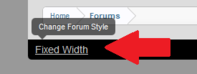
  1. Just a reminder, if you wish to change the forum look/style, you can do so by selecting a different one from the style chooser. It looks like this and can be found bottom left of every page.

    sc.png
    josmoloco likes this.
  2. Without boring anybody with the details, our style has changed.....sort of. The look itself hasn't changed, just stuff behind the scenes. You're probably asking "And why would we care about this?". Well the default style has been changed to a fixed width, however you can switch back to the fluid version via the style chooser at the bottom. :thumb:
  3. Updated to reflect the latest changes.